Auto-Bidding for Upwork

The Upwork bidder that bids on every job that fits - while you sleep.

Upwex is the Upwork bidder built as a freelancer auto bidding bot - the Upwork bid automation that scans new postings 24/7, scores every job against your rules with AI, and runs Upwork auto apply on every match. The freelance bidder for serious bidding on Upwork without burning connects. You wake up to interviews, not to scrolling.

4.8 on Chrome Web Store Free 20 AI credits No card

Upwex Auto-Bidding dashboard showing scanned jobs, match scores, and submitted proposals
How it works

How does the Upwork auto-bidder work?

Set it up once. Upwex watches the Upwork feed, evaluates each new job, and only submits when there's a real fit.

  1. 01

    Scan the feed in real time

    Watches the Upwork search page 24/7 with smart intervals (2-10 min, configurable). Pre-filters by job type, age, and budget before opening anything - saves API time and connects. It doubles as an Upwork job feed monitor: every posting it catches is logged whether or not you bid.

    Runs in background tab
  2. 02

    AI matches against your rules

    Upwex AI evaluates 40+ job fields - budget, client history, payment verification, qualifications, language requirements - and scores fit from 0 to 100. Red flags filter out scams before you spend a connect.

    Skip threshold + red flags
  3. 03

    Submit a tailored proposal

    Generates a cover letter in your voice, answers screening questions, sets your hourly rate, and submits - all automatically. Every bid is unique to the job, not a template blast.

    Cover letter + Q&A + rate
Why Upwex

What makes Upwex the best Upwork bidding bot?

The Upwork bidding software freelancers actually use - built for quality contracts, not connect-burning spray-and-pray automation.

AI Job Matching (40+ fields)

Every job is scored against client rating, hire rate, total spent, payment verification, required qualifications, and budget fit - not just title keywords.

Red-flag detection

Skips unverified payments, low-budget posts in disguise, $0-spent first-jobs, low-rated clients, and overqualified asks - before submitting a proposal.

Connects-aware

Tracks remaining connects and your daily budget. Auto-pauses when you hit your threshold so you never wake up with a zero balance.

Live activity log

Every scan, match, skip, and submission is logged with timestamps, match score, and the reason - no more guessing what the bot has been doing.

Human-like bidding

Randomized 300-3000ms delays between actions, natural cursor movements, real form interaction - not bot-flag triggers Upwork uses to detect automation.

Analytics dashboard

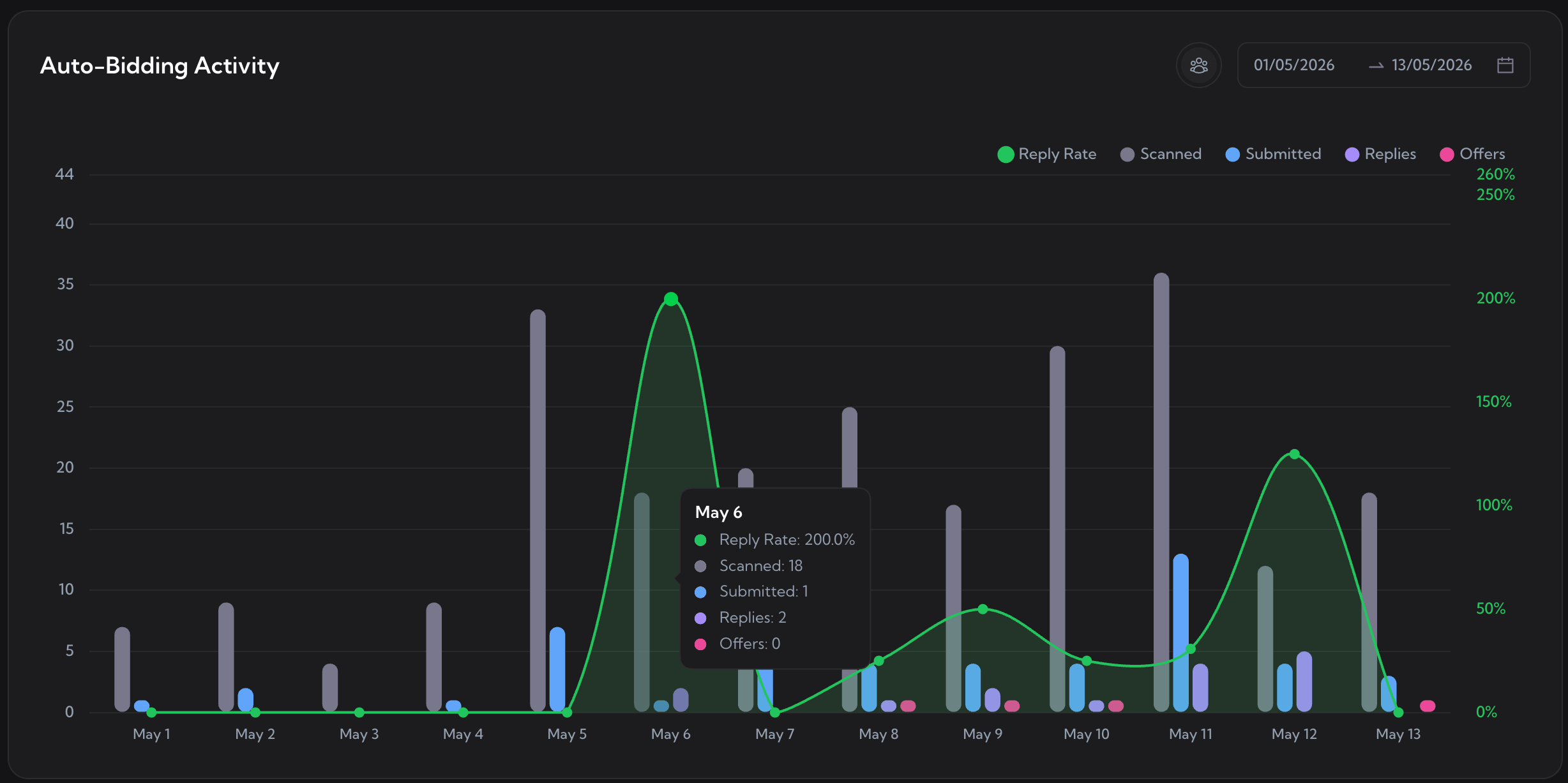
Web command center shows scanned/submitted/replies/offers per day, per profile, per template - see what's converting and double down.

Your cover letter templates

Bring your own prompts. The bot writes in your voice - uses your past proposals, your portfolio links, your phrasing. Multiple templates by job type.

One-click pause

Stop the bot instantly from the extension, web dashboard, or by closing the tab. State is preserved - resume exactly where it left off.

Multi-profile, team-ready

One freelance bidder per Upwork profile - run separate auto-bid setups for each persona you bid as. Agency owners can manage every team member's bot from one place.

Granular control

Bidding on Upwork the way you actually want to.

Twelve settings shape your Upwork bidding strategy - which jobs the bot picks up, how many connects per day it can spend, and when it should pause itself. Automated Upwork bidding without breaking the rules: your rules, your upwork bidding process, not a black box.
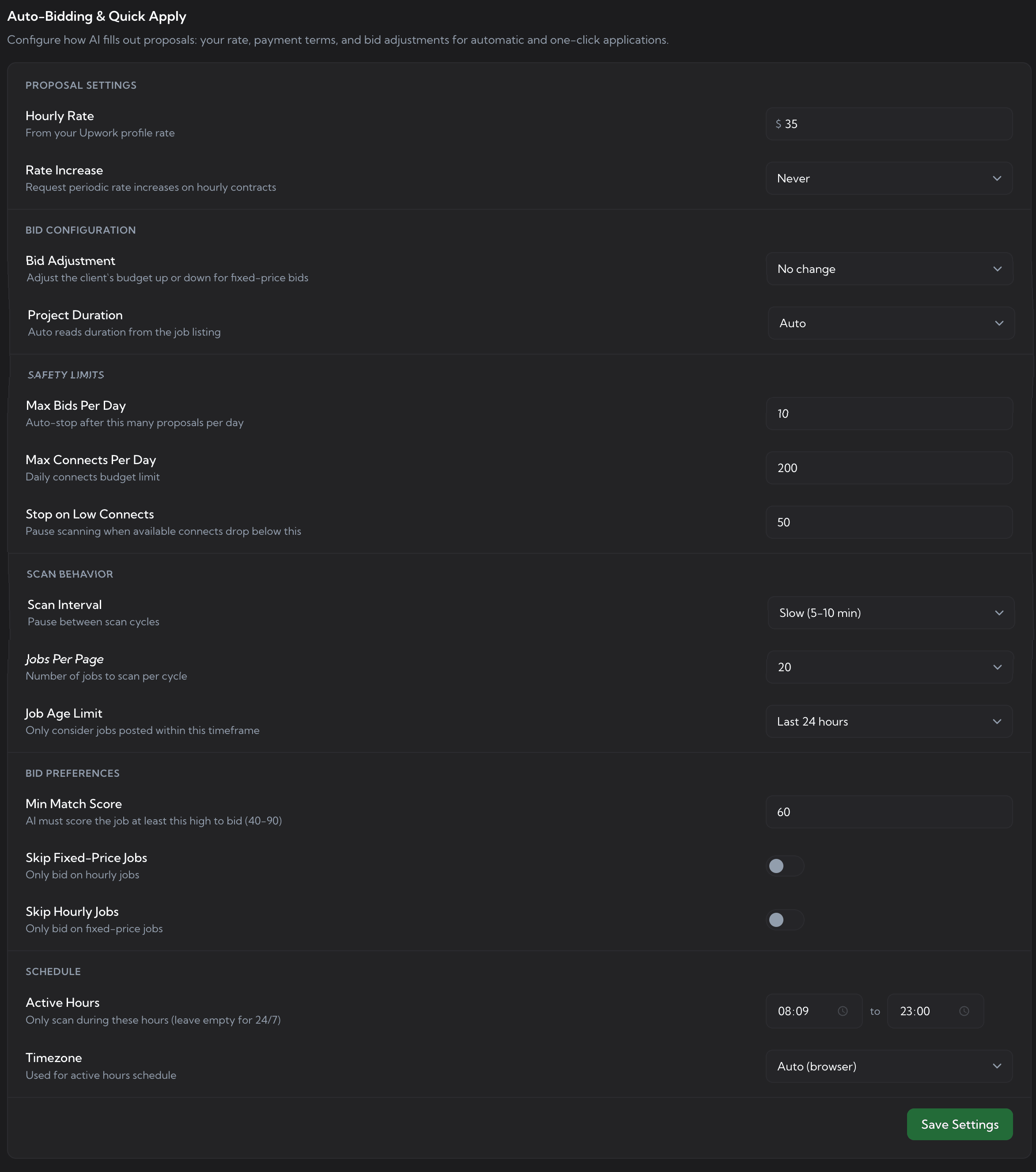
Scan interval Match score threshold Hourly rate Max bids per day Max connects per day Pause-on-low-connects Job type filter Project duration Custom match prompt Custom red-flag prompt Cover letter template Boost connects rule
Upwex Auto-Bidding settings panel - hourly rate, bid adjustment, max bids per day, max connects, scan interval, min match score, active hours
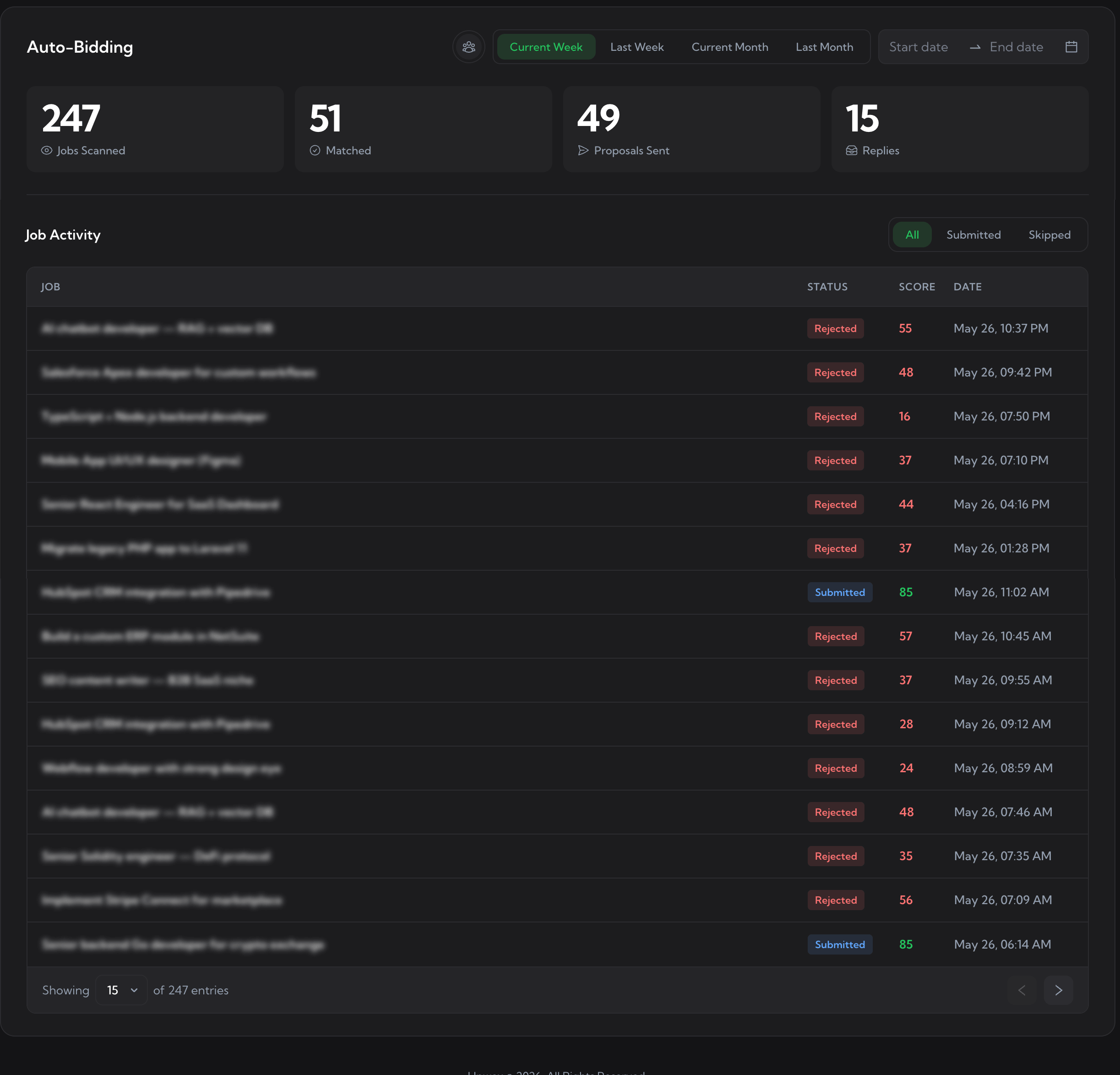
Auto-Bidding dashboard - 247 jobs scanned, 51 matched, 49 proposals sent, 15 replies, plus the job activity table with per-row status and score
Auto-Bidding daily activity chart - Reply Rate, Scanned, Submitted, Replies, and Offers per day with hover tooltip
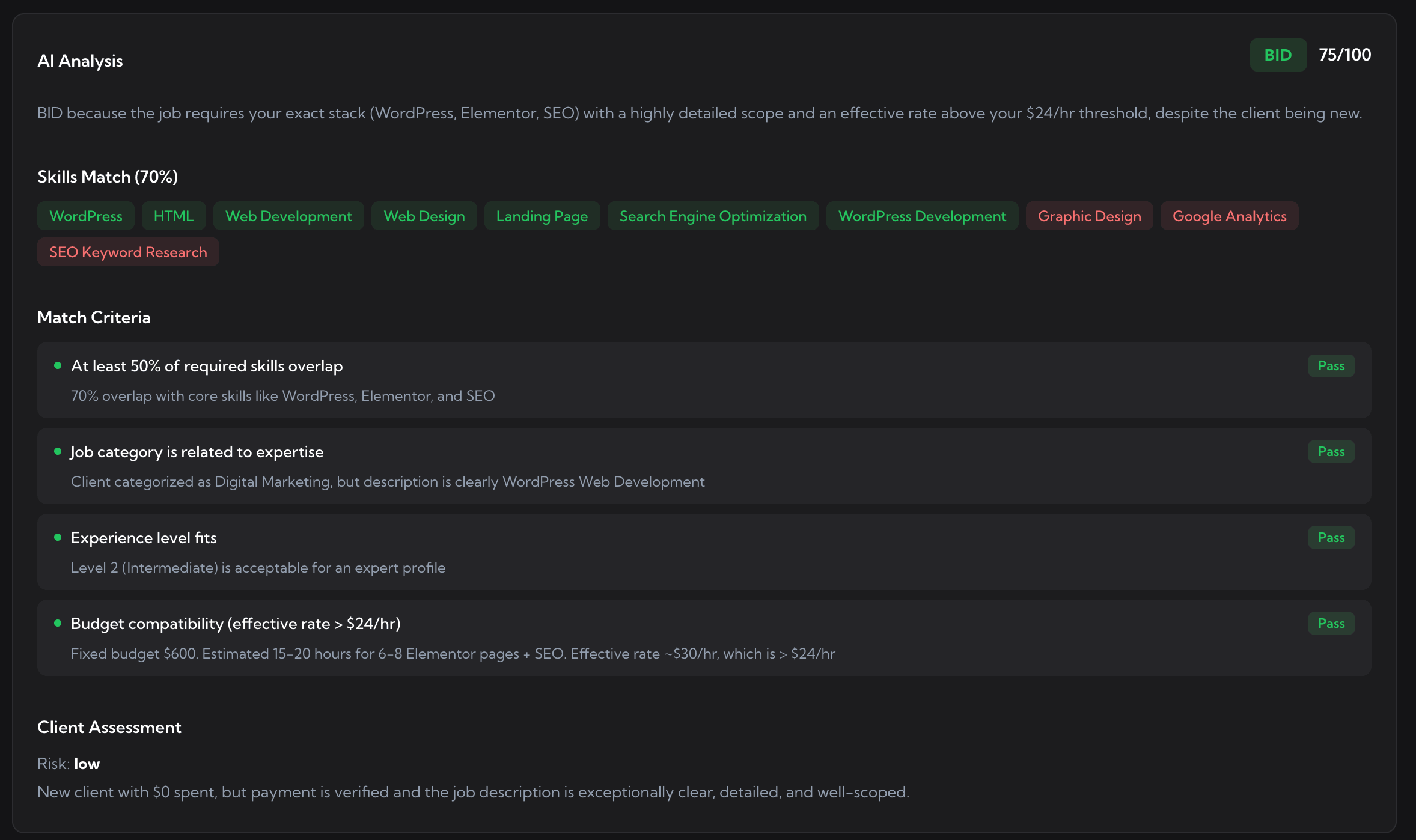
Auto-Bidding accept-job analysis - BID verdict 75 out of 100 with skills match, match criteria all pass, and client assessment risk low
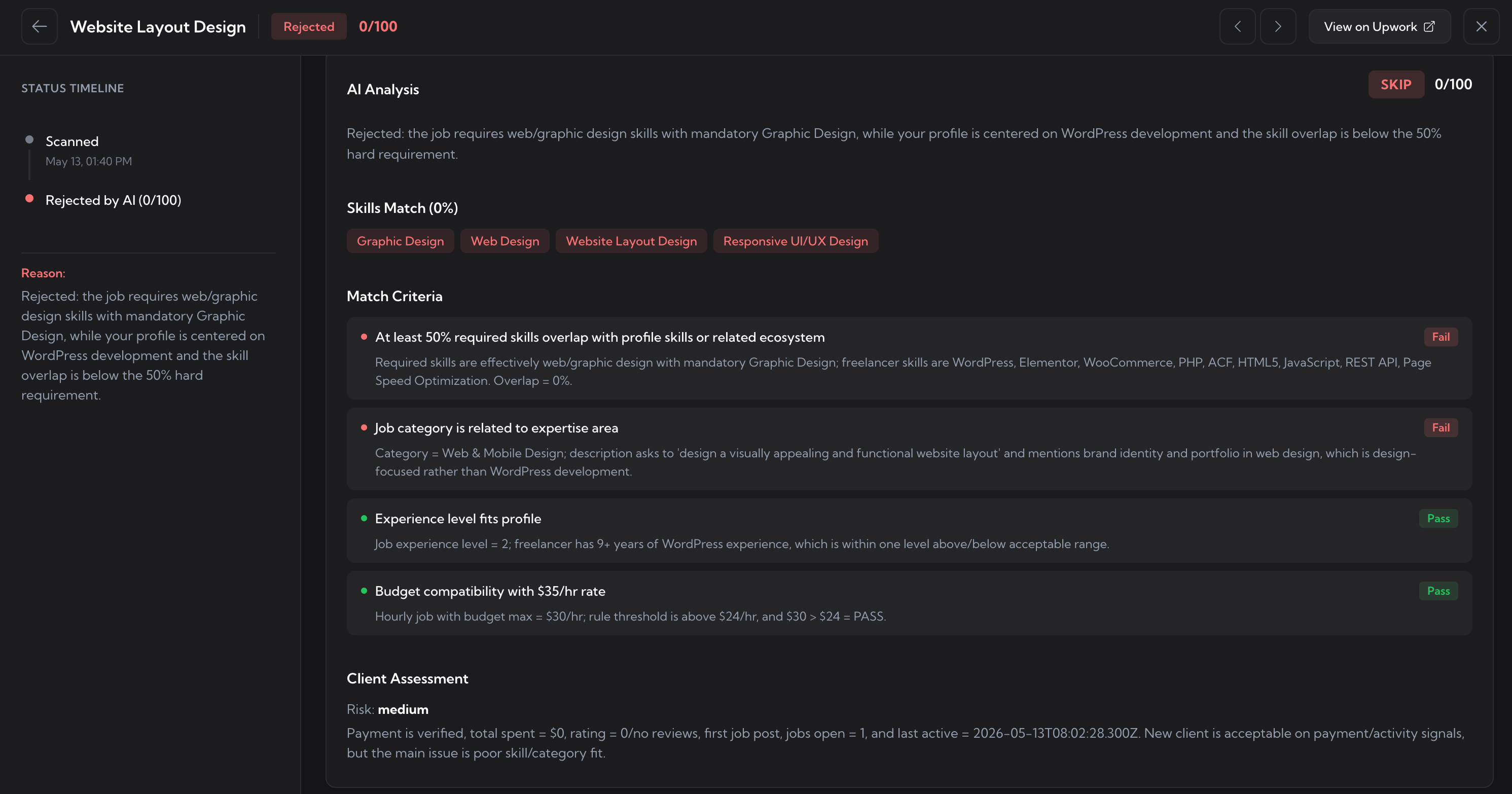
Auto-Bidding reject-job analysis - rejected by AI 0 out of 100 with status timeline, skills mismatch, failed match criteria, and client assessment
Job lifecycle

Every job. Every status. Every step.

From the second a job is posted to the moment a client replies - see exactly what the bot did and why.

  1. Scanned scanned

    New job appears in the Upwork feed. Upwex picks it up within 2-10 minutes, pre-filters by your job type and minimum budget, and queues it for AI evaluation.

  2. Matched by AI matched

    Upwex AI evaluates 40+ job fields against your profile, rules, and red flags - returns a match score (0-100) with reasoning. Below your threshold? The job is skipped with a reason logged.

  3. Proposal submitted

    A tailored cover letter is generated using your template, screening questions answered, hourly rate set, and the form is submitted - with human-like timing that doesn't trigger Upwork's automation detection.

  4. Client replied reply

    When the client responds, the message lands in your inbox. Upwex tracks reply rate per template and per profile so you can see what's actually working - and ditch what isn't.

Pricing

Auto-Bidding is included with the Max plan.

Start free for 7 days. No card required. Cancel anytime.

Lite

$ 9.99 /month
Monthly billing only
  • Check Fit Job Analyzer (0-100 score)
  • AI Cover Letter + Screening Q&A
  • Cover Letter Templates with per-template reply rate
  • Full analytics dashboard + Activity Heatmap
  • Multi-profile + Weekly recap emails
  • Adaptive AI engine (auto-failover)
  • 100 AI Credits / seat / month

Max

$ 49 /month
  • Everything in the Pro plan
  • 500 AI Credits / seat / month
  • Auto-Bidding scanner (24/7, hands-free)
  • Custom Match Algorithm prompt
  • Custom Red Flags prompt
  • 15+ Auto-Bidding settings (caps, schedule, scan)
7-day free trial No credit card required Cancel anytime
FAQ

Common questions about Auto-Bidding.

Is Upwork auto-bidding allowed?
Upwex runs inside your own browser as a Chrome extension. It uses your existing Upwork session and submits proposals through the same interface you use manually - no scraping, no external API calls to Upwork. Bids are sent with human-like delays and natural form interaction so they read as your activity, not automated traffic.
How is the match score calculated?
Upwex AI receives the full job posting plus your profile, custom match rules, and red-flag prompt. It evaluates 40+ fields - budget vs your rate, client hire rate, total spent, payment verification, required qualifications, language, region, screening questions - and outputs a score 0-100 with reasoning. You set the threshold below which the bot skips.
Will it burn through my connects?
No. You set max bids per day and a connects threshold. Once the bot hits either limit it pauses itself until the next day. Match score thresholds also prevent low-fit bids - most users finish the day with connects unspent, not depleted.
Can I review proposals before they go out?
Auto-Bidding submits automatically once a job clears your filters and match threshold - that's the whole point. If you'd rather stay hands-on, just use the manual flow: open a job yourself, click "Generate Cover Letter" to get an AI-written proposal tailored to the post, and use one-click autofill to populate the Upwork form. You stay in full control and still skip the busywork.
What happens if a job has screening questions?
The same AI Q&A engine answers them based on your profile and past projects. Answers are concrete and job-specific - no generic boilerplate. If a job's questions can't be answered safely (sensitive personal data, NDA scope), the bot skips it and logs the reason.
Do my custom cover letter templates still get used?
Yes. Bring your own prompt or pick from our library. The bot uses your template as a skeleton and fills it with job-specific context, your portfolio links, and your real hourly rate. You can have multiple templates and the bot picks the most relevant for each job type.
What if it makes a mistake?
Every submitted bid is logged with the cover letter text, screening answers, and rate used - you can audit anything. If a single bid was off, you can withdraw it on Upwork. If the bot is bidding on wrong jobs systematically, tighten your match prompt or red-flag rules and the next batch will reflect the change.
What is Upwork auto-bidding and how does the Upwork auto-bidder work?
Upwork auto-bidding is the automated process of scanning new Upwork job postings, scoring each one for fit against your rules, and submitting a tailored proposal without manual work. The Upwex Upwork auto-bidder is the Chrome extension and AI engine that handles every step of the upwork bidding process for you: pulls jobs from the feed every 2-10 minutes, evaluates them against 40+ fields (budget, client history, payment verification, qualifications), and submits when a job clears your match-score threshold. Whether you're learning Upwork bidding for beginners or refining an advanced upwork bidding strategy, the bot follows your rules. It's the answer to "freelancer how to bid" at scale - and the most realistic way how to bid on freelancer marketplaces 24/7 without burning your day on the feed.
Best Upwork bidding bot vs alternatives - how does Upwex compare?
Most Upwork bidder tools look similar at a glance - one button, one bot, one set of filters. The Upwex Upwork bidding bot stands apart on five points: (1) 40+ job fields evaluated per match, not just title keywords; (2) 12 configurable settings for granular bidding on Upwork - max bids/day, max connects/day, scan interval, red-flag prompts, custom match prompts; (3) human-paced timing (300-3000ms between actions, 30-80ms per keystroke) so Upwork's framework treats it as real activity; (4) connects-aware - the bot pauses itself when your balance dips below your floor; (5) multi-profile support so each Upwork persona has its own freelance bidder. For people researching upwork bidding samples, upwork bidding course content, or the best time to bid on Upwork (typically 8am-11am client-local-time), the Upwex analytics dashboard shows real reply-rate per template, per profile, per hour - so you stop guessing and start running what works.
What's the best Upwork bidding tool?
The best Upwork bidding tool is the one that respects your connects, matches your real skill profile, and keeps you in control. Upwex bundles all three: AI matching against 40+ job fields (skill, client quality, budget, competition, risk, timing), 12 hard-stop rules you set, and a kill-switch you can hit from anywhere. It's an Upwork bidding software you tune to your strategy - not a black-box autopilot. Free 7-day trial, no credit card.

Stop refreshing the Upwork feed.

Set up your rules in 10 minutes. Let Upwex bid for you 24/7. Wake up to interviews - not "applied 12 hours ago".

No credit card required. Cancel anytime.