
Owner
One per team, set at sign-up. Holds the billing, can invite or remove anyone, and changes roles. The owner row is locked - it cannot be demoted or deleted, so the account always has a clear point of control.
Running an Upwork agency means juggling several freelancers, several profiles, and one reputation. Upwex is built for it: invite every member of your Upwork agency into one workspace, give each the right role, manage billing seats in one place, and share a single AI credit pool. Every member's proposals, replies, and connects roll up into your analytics - so you see the whole agency, not three separate accounts.
Free 20 AI credits No card
The Team page opens with the numbers that matter: total members, how many are active, how many invites are still pending, and your shared AI credit pool. Below sits the member list - every freelancer in your Upwork agency with their status and role. Search by name or email, filter by role, and invite a new member from the top-right.
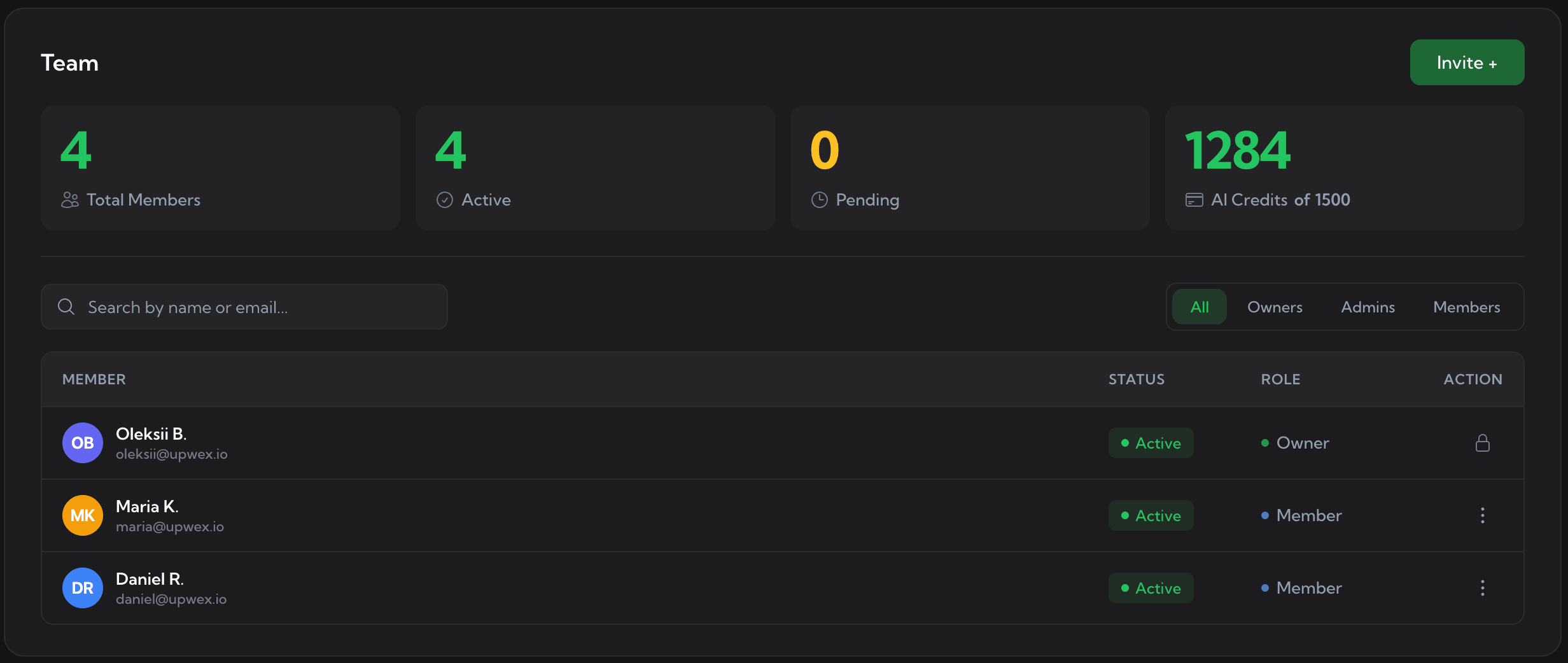
The Team page. Stat cards on top, the searchable member list below, Invite in the top-right.
Every member of your Upwork agency gets one of three roles. The Owner runs the account, Admins help manage the agency, and Members do the bidding. Owners and admins can switch anyone between Admin and Member.
One per team, set at sign-up. Holds the billing, can invite or remove anyone, and changes roles. The owner row is locked - it cannot be demoted or deleted, so the account always has a clear point of control.
Manages the team day to day: invite and remove members, switch roles between Admin and Member, and see every profile's analytics. Everything the owner does, short of owning the billing.
Does the work: bids, generates proposals, and runs Auto-Bidding under their own Upwork profile. Their activity rolls into team analytics; they focus on bidding, not on managing other seats.
Inviting is one modal and an email. Upwex handles the seat and the billing behind it, and blocks anything that would double-charge you.
Open the Invite modal and type your teammate's email address.
Upwex checks for a free seat. If there is none, it shows the prorated cost of adding one before you confirm.
Your teammate gets an email invite. Duplicate and self-invites are blocked - no double invites, no double charges.
Once they accept, they are an active member with their own profile, their own bidding, and their own line in your analytics.
Upwork sets its own agency fees on contracts. The Upwex side is simple: no per-person accounts to reconcile - it bills your agency as one, scales seats as you grow or shrink, and pools the AI credits everyone shares.
Seats are billed at the team level through Stripe, not per person. One subscription, one invoice, however many freelancers you run.
Invite a teammate mid-cycle and Upwex adds a seat with a prorated charge for the days left. Remove one and the unused time comes back as a prorated credit. You only pay for active seats.
Every plan comes with a pool of AI credits the whole team draws from - cover letters, job analysis, AI answers. One pool, shown right on the Team page, topped up as a team.
An Upwork agency is only as strong as its weakest pitch. The Upwex analytics dashboard breaks proposals, replies, reply rate, invites, DMs, offers, and connects down per profile and per member, with a totals row on top. Spot who is converting, who needs a better template, and where the connects are going.
Stop juggling separate accounts and separate invoices. Start a free trial, invite your freelancers, and run the whole agency - roles, seats, and analytics - from one dashboard.
No credit card required. Cancel anytime.
We use cookies to make Upwex work, understand how the site is used, and - with your permission - measure marketing campaigns. See our Cookie Policy and Privacy Policy.
Choose which categories of cookies Upwex can use on this device. You can change this any time from the Cookie Preferences link in the footer.
Required for the site to function. Sign-in, security, and remembering your cookie choice itself.
We see which pages get visited so we can improve them. No personal data tied to your identity.
Lets us measure ad campaigns that brought you here, and (if applicable) show relevant ads elsewhere.
Remember things like dark mode and language so you don't reset them every visit.