
A job from the feed worth acting on.
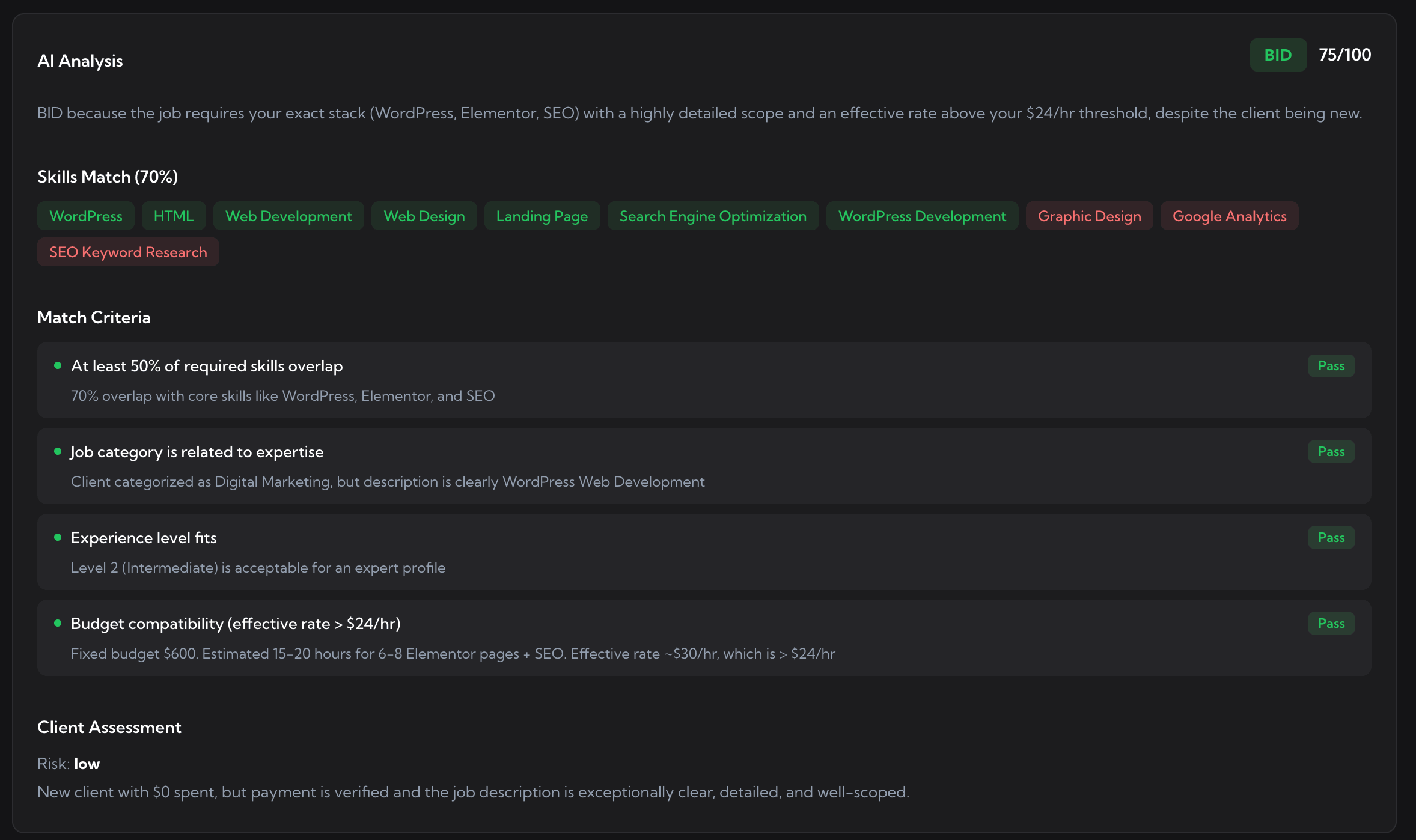
Scored 75/100: 70% skills overlap, the category fits, the experience level fits, the rate works. All four criteria pass, client risk is low. Watch it in the log, or let Auto-Bidding submit for you.
Upwex Auto-Bidding watches the Upwork job feed for you, around the clock. Upwork retired its RSS job feeds, so the old way of monitoring new postings is gone - Auto-Bidding is the replacement: it catches every new job the moment it posts and logs it in one place, like real-time Upwork job alerts with no RSS reader. When a job is worth it, it submits a proposal for you; leave it on watch-only and just read the feed.
Free 20 AI credits No card
For years freelancers piped the Upwork RSS feed into a reader to catch new jobs without living on the search page. Then Upwork removed RSS feeds, and that workflow broke. Upwex Auto-Bidding is the Upwork RSS feed alternative: instead of an RSS file, the Auto-Bidding scanner watches the live job feed for you, every few minutes, around the clock. You get the same outcome the RSS feed for Upwork used to give you - new jobs delivered to you - without the dead RSS link.
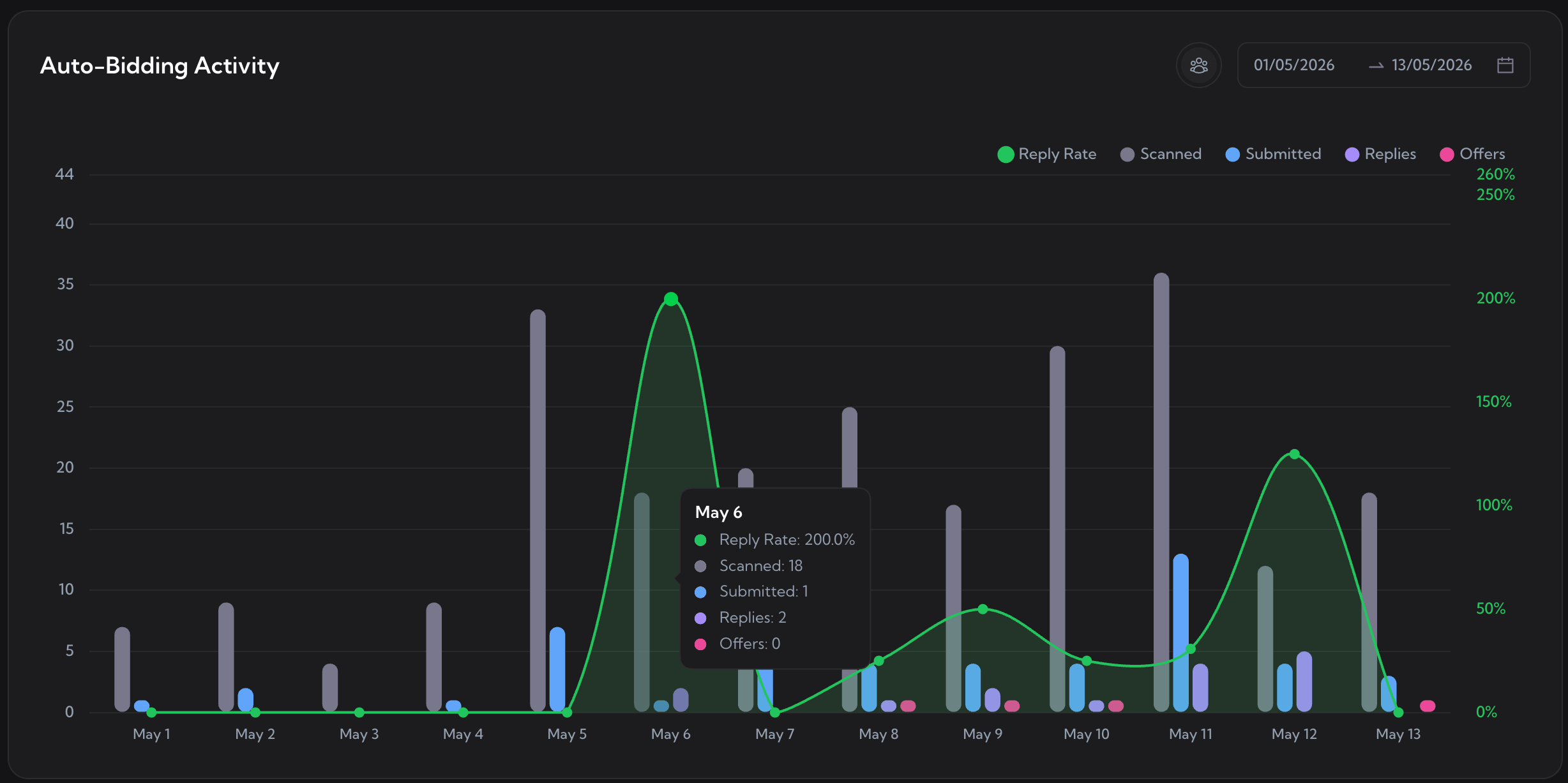
Jobs caught from the Upwork feed, day by day. The feed is watched continuously, not on a manual refresh.
Upwork's own job alerts are slow and broad. Upwex Auto-Bidding turns the feed into Upwork job alerts you actually control: the scanner watches the Upwork job feed on your interval and catches every new posting that fits. Here is how a job goes from posted to sitting in your log.
Auto-Bidding scans the live Upwork job feed on your interval, as often as every few minutes, around the clock.
Every new posting that fits your skills, rate, and filters is pulled from the feed within minutes of going live.
AI scores each job 0-100 against your synced profile, so a strong match stands out from the noise.
The job appears in your dashboard with its score, status, and the time it was caught from the feed.
The Auto-Bidding dashboard doubles as an Upwork job feed tracker. Four headline stats show how many jobs the feed surfaced, matched, were bid on, and replied to. Below sits the job log: every posting Auto-Bidding caught from the feed, with its status, match score, and timestamp. Filter by date or status, or pick a team member, and nothing from the feed gets lost.
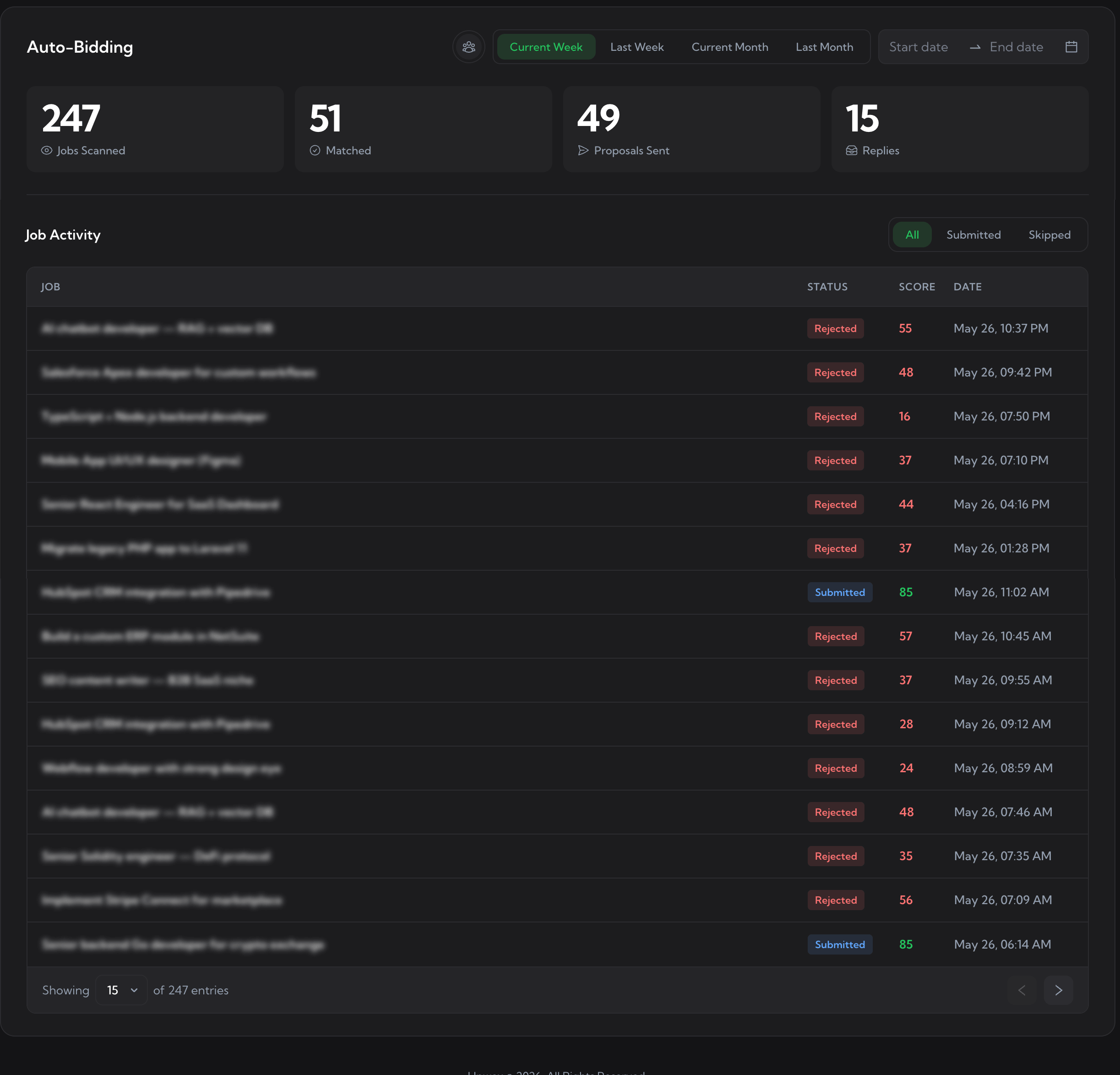
The Upwex Auto-Bidding dashboard, working as your Upwork job feed tracker. Period filters and the team member picker live at the top; every job caught from the feed is logged below.
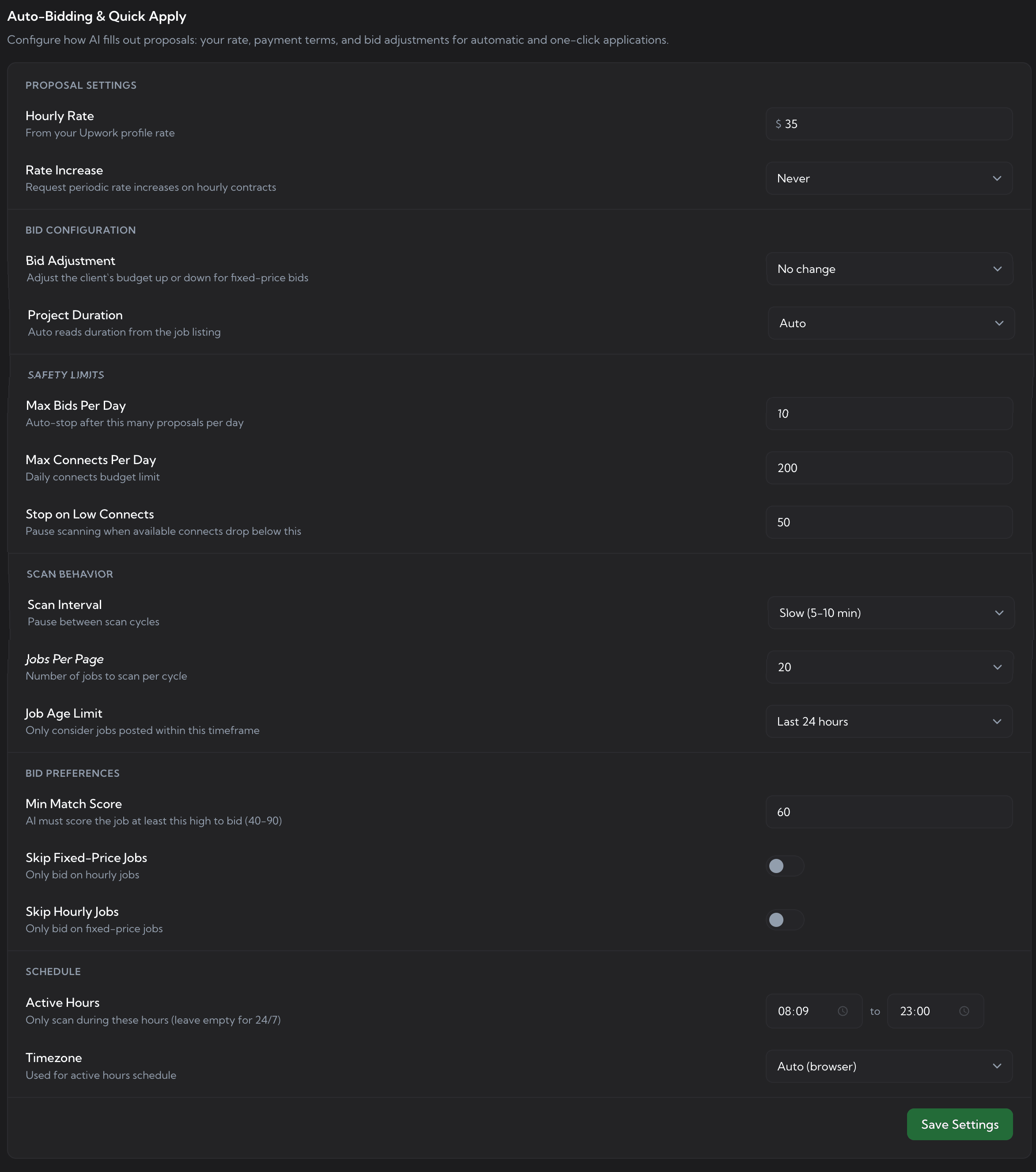
A raw feed is noise. These are your Auto-Bidding settings, and they double as feed filters: six groups decide what Auto-Bidding catches from the feed and what it ignores, so the only jobs that reach your log are the ones you would actually consider. Change a value, save, and Auto-Bidding picks it up on the next scan.
Your hourly rate (synced from your Upwork profile) and optional periodic rate-increase requests on hourly contracts.
Adjust the client's budget up or down for fixed-price jobs, and set project duration or let Auto-Bidding read it from the listing.
Max bids per day, max connects per day, and a Stop on Low Connects threshold that pauses scanning before your connects run out.
Scan interval, jobs per cycle, and a job age limit so Auto-Bidding only considers postings fresh enough to be worth catching.
Min Match Score (40-90) - jobs below it are filtered out - plus toggles to skip fixed-price or skip hourly jobs.
Active hours and timezone, so Auto-Bidding only watches the feed during the window you choose. Leave it empty for 24/7.
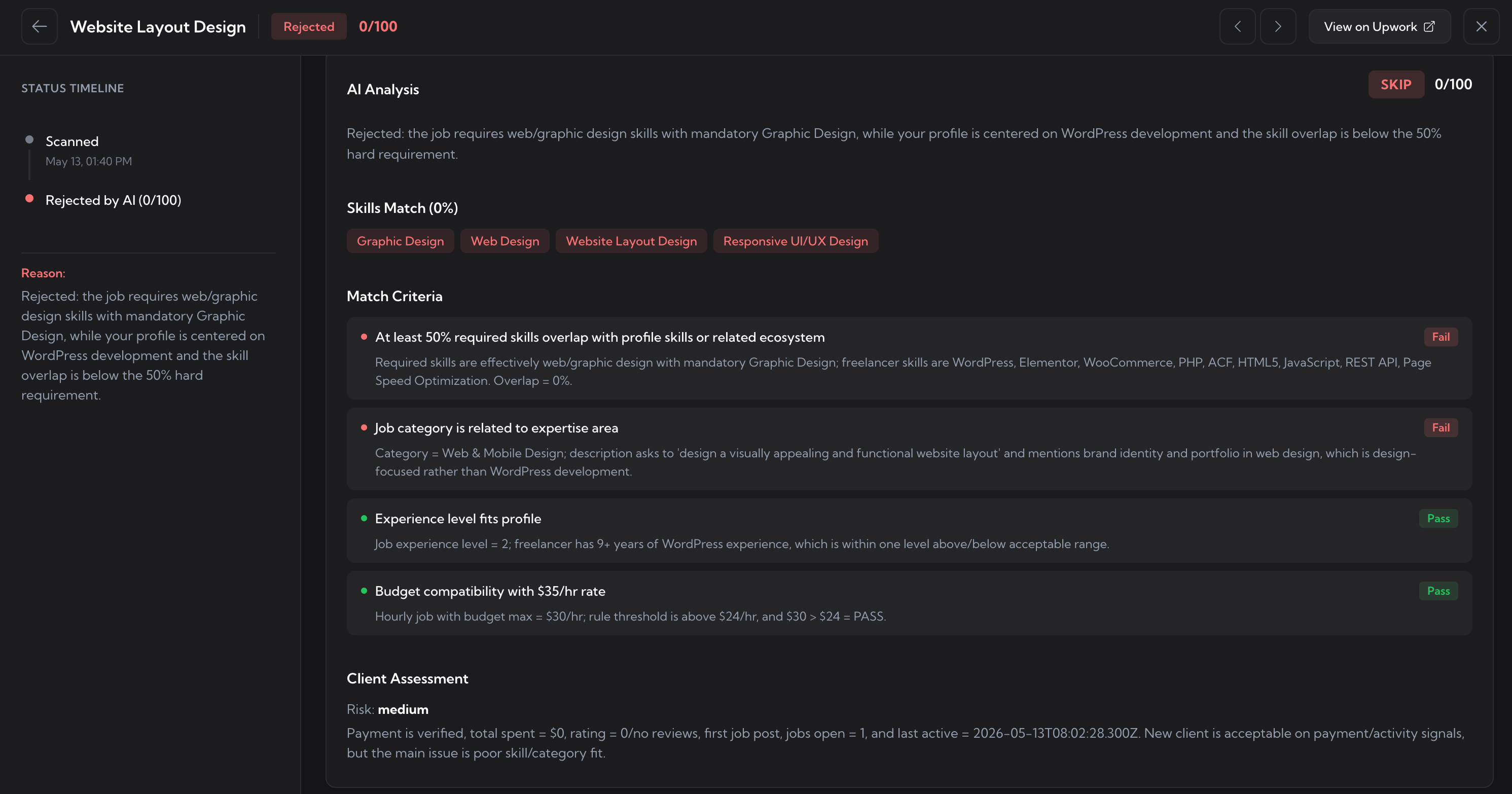
Auto-Bidding scores every job it pulls from the feed with a full AI verdict: a score out of 100, a skills match percentage, match criteria marked Pass or Fail, and a client risk read. You can stop there and just watch the log, or let Auto-Bidding submit a proposal on the jobs that clear your score.
Scored 75/100: 70% skills overlap, the category fits, the experience level fits, the rate works. All four criteria pass, client risk is low. Watch it in the log, or let Auto-Bidding submit for you.
Scored 0/100: skills overlap is 0%, the category is outside your expertise. The status timeline logs when it was caught and screened out, and the reason spells out why - so a weak job never wastes a connect.
The Upwork RSS feed is not coming back. Set Upwex to watch the feed instead, and every new job that fits lands in your log - ready to read, ready to bid. Start a free trial and never miss a posting again.
No credit card required. Cancel anytime.
We use cookies to make Upwex work, understand how the site is used, and - with your permission - measure marketing campaigns. See our Cookie Policy and Privacy Policy.
Choose which categories of cookies Upwex can use on this device. You can change this any time from the Cookie Preferences link in the footer.
Required for the site to function. Sign-in, security, and remembering your cookie choice itself.
We see which pages get visited so we can improve them. No personal data tied to your identity.
Lets us measure ad campaigns that brought you here, and (if applicable) show relevant ads elsewhere.
Remember things like dark mode and language so you don't reset them every visit.