Everything one freelancer needs to win more Upwork jobs.
You are the pipeline. Every connect you waste is your money, every bid you write is your hour,
every job that posts while you sleep is income you missed. Upwex is the AI toolkit built for
exactly that: stop burning connects on bad fits, write proposals in your voice in seconds, and
let the bot bid for you 24/7 inside hard daily caps you control.
Job Analyzer (Check Fit) scores any Upwork posting 0 to 100 against your synced profile in about
5 seconds. You see which skill criteria pass and which fail, an experience and budget read, and a
client risk assessment - all before you spend a single connect. Solo bidders typically save 10
to 24 connects per skipped bad-fit job.
AI Cover Letter Generator drafts a tailored proposal in under 10 seconds, pulled from your
synced Upwork profile and the cover letter template you set as default. One-click Proposal
Autofill drops the cover letter, screening answers, and your rate into Upwork own proposal form.
You review and click Send.
Step 1 · Generate
AI writes the proposal in your voice.
Open any Upwork job, click Generate, and the AI drafts a tailored cover letter using your
profile and your default template. Variables like [Client Name] and
[ProofPoint] get filled in for that specific posting.
Step 2 · Autofill
One click drops it into Upwork form.
The Autofill engine populates Upwork own proposal form: cover letter, screening answers, and
rate. You see it filled in the same interface you use manually. Review, edit if needed, hit
Send.
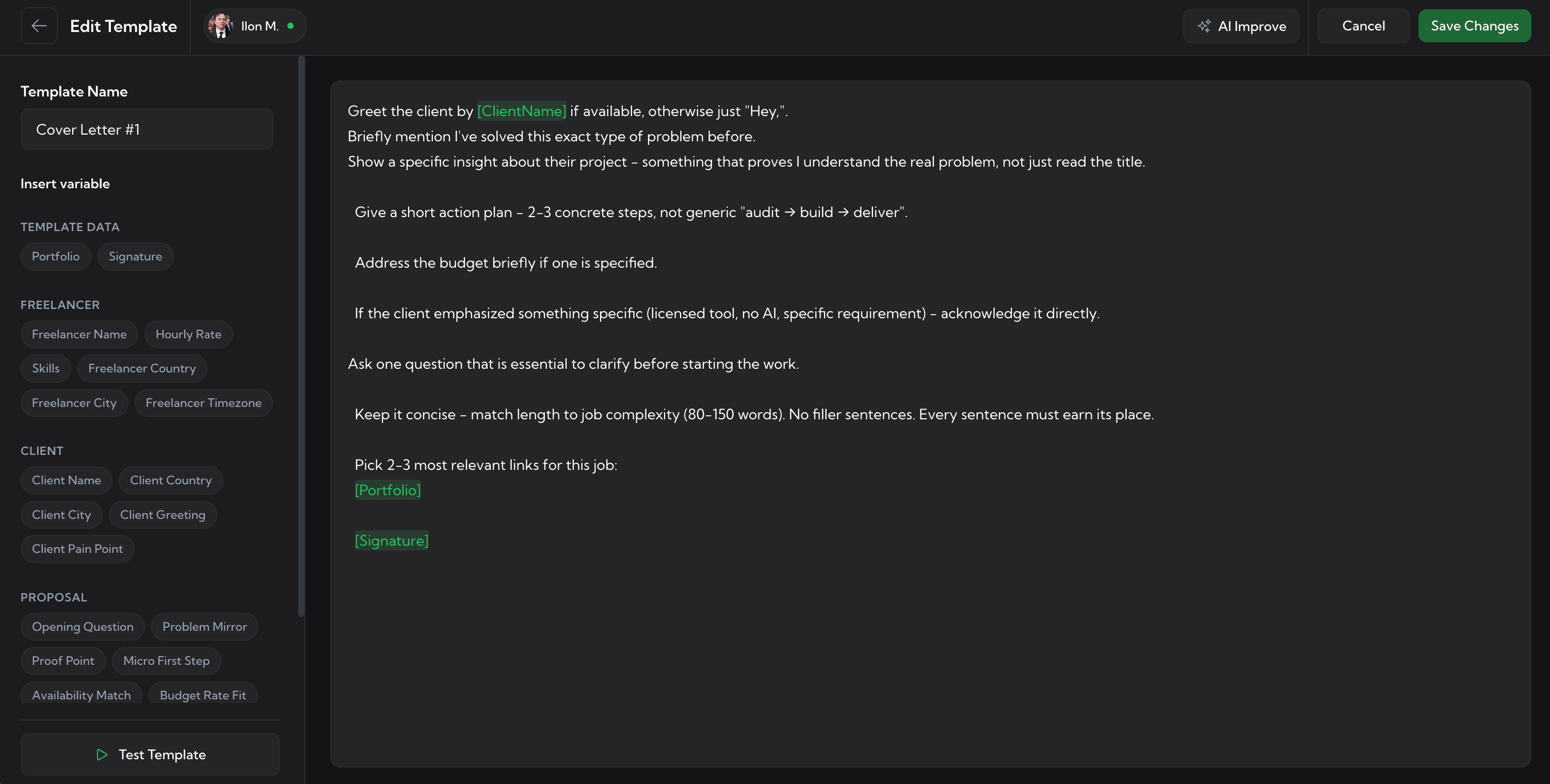
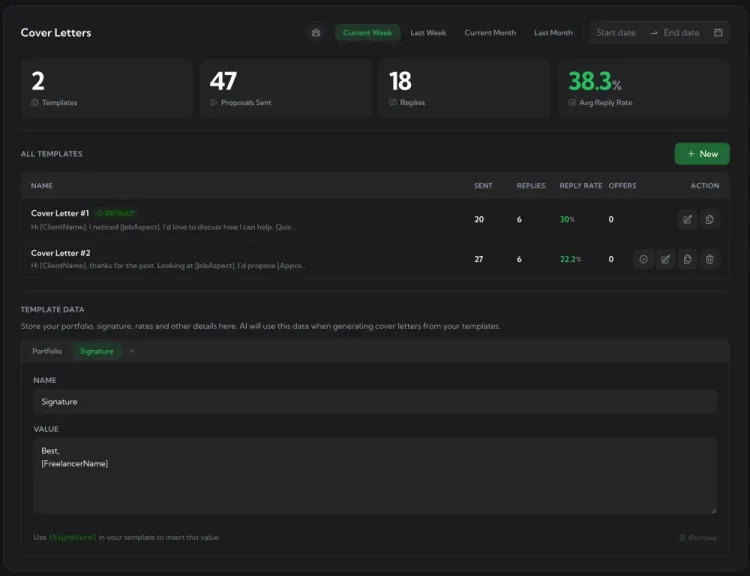
A template per niche, with per-template reply rate.
Keep one template per niche, language, or pitch angle and watch which ones actually pull
replies. Upwex tracks reply rate, send count, and offers per template, so you stop guessing
which opener works. AI Improve tightens a weak template in place; AI Generate seeds a new one
from your profile; Test Template runs the full pipeline on a real Upwork job before you ship it.
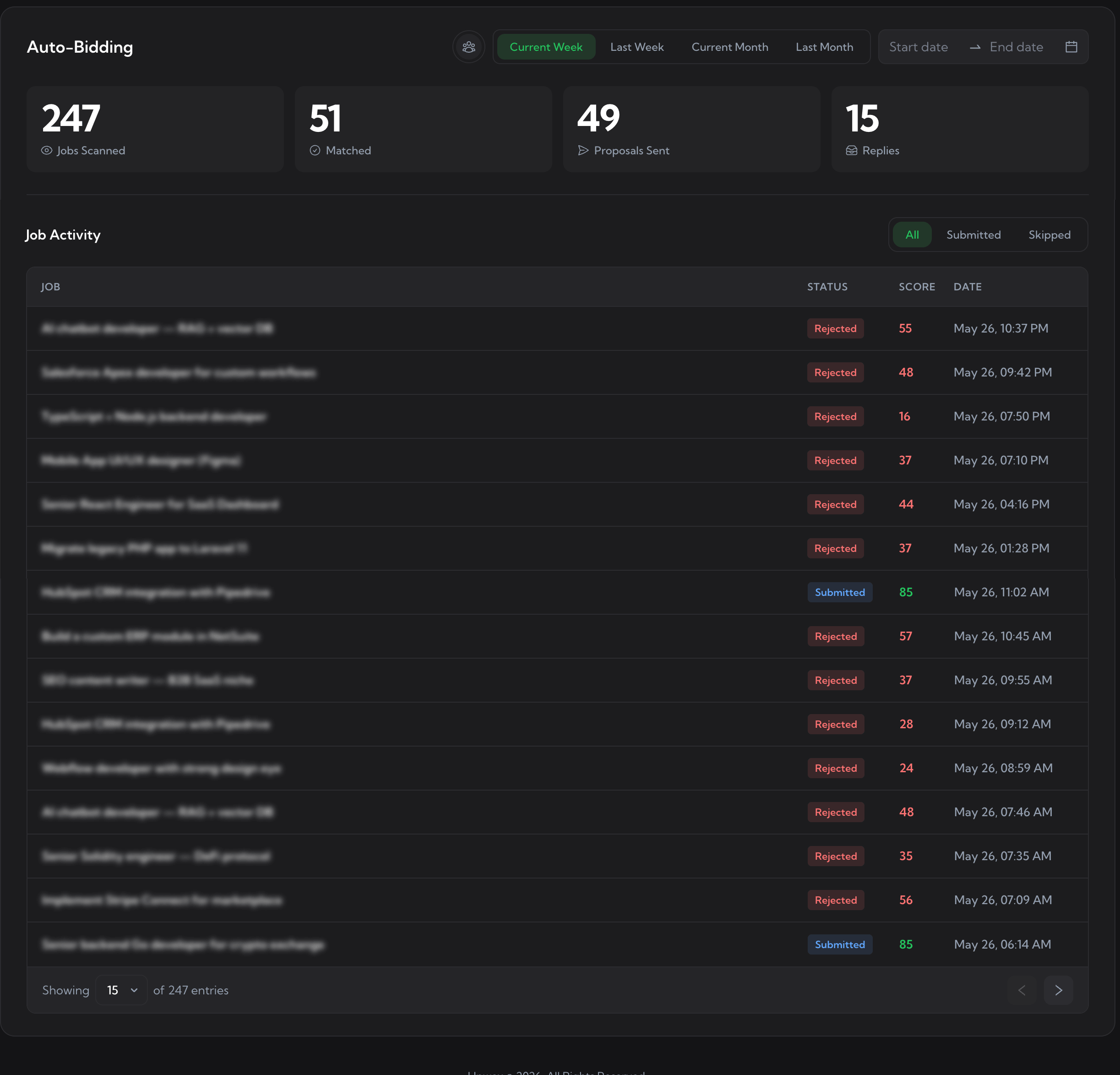
Auto-Bidding watches the Upwork feed around the clock and bids on jobs that clear your match
score. It is not hands-off spam: you set Max Bids Per Day, Max Connects Per Day, Stop on Low
Connects, and a Min Match Score. The bot never goes past the limits you set, and every job it
touched shows up in your log with the AI verdict behind the decision.
01 · Cap it
Set the daily limits first
Max bids per day, max connects per day, a Stop on Low Connects threshold - the guardrails that keep your wallet safe.
02 · Filter
Pick what counts as a match
Min match score (40-90), skip fixed-price or hourly, scan interval - the bot only bids on jobs that clear your rules.
03 · Schedule
Run only when you want
Active hours and timezone let the bot scan during a chosen window or 24/7. Sleep, take a day off, the rules stay yours.
04 · Review
Watch the queue, not the feed
Every scan, match, bid, and skip lands in your dashboard with the AI verdict and reasoning. Read once a day, refine the rules.
Match score on every new job, before you spend a connect.
Upwork retired its RSS job feeds, so the old way of monitoring new postings is gone. Upwex is
the replacement: the same Auto-Bidding scanner watches the live Upwork job feed around the clock
and surfaces every new job with a match score. Watch the log and bid manually, or let
Auto-Bidding act on the strong ones.
One click pulls your Upwork profile into every Upwex feature.
Profile Sync pulls your Upwork freelancer profile - skills, portfolio, hourly rate, voice - into
your Upwex workspace. From there it powers every AI tool: the Cover Letter Generator drafts in
your voice, Auto-Bidding scores jobs against your real skills, AI answers screening questions
using your stated expertise. Run two niches? Sync both profiles and pick which one bids on which
job.
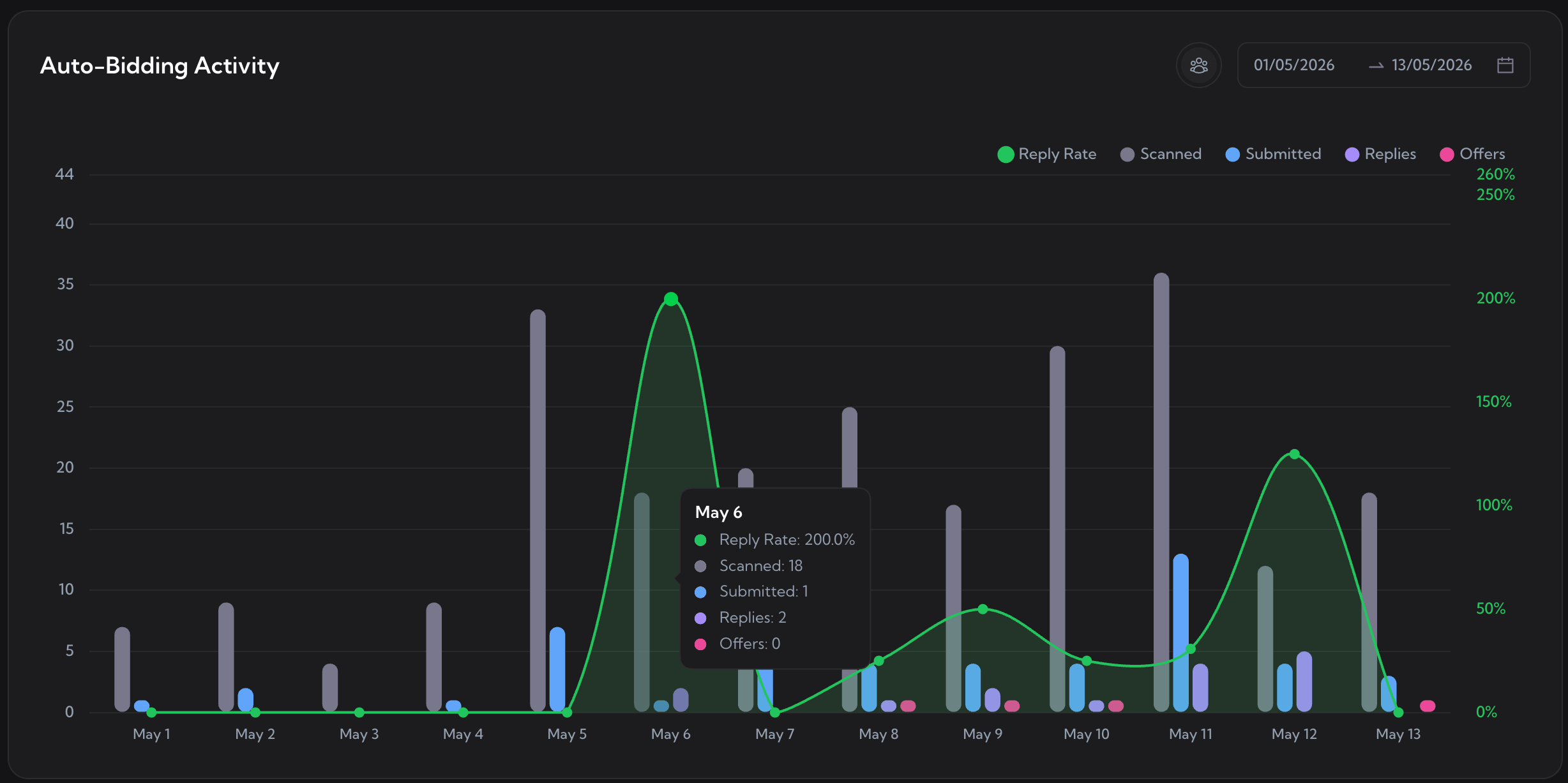
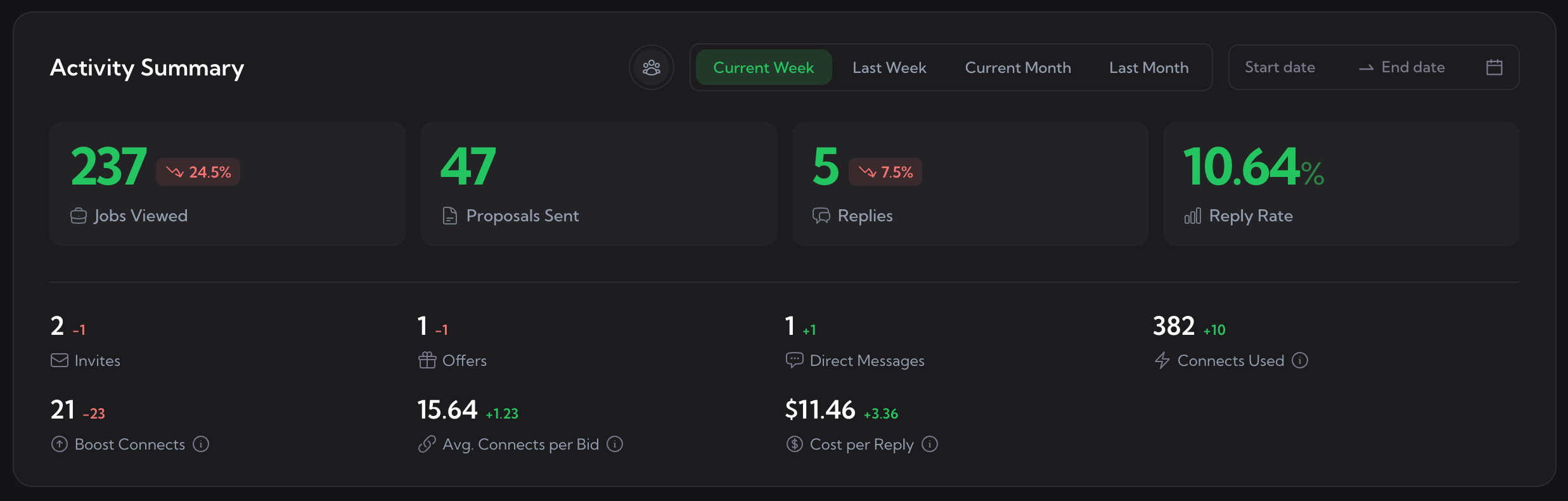
Reply rate, cost per reply, and the days clients actually answer.
The Upwex analytics dashboard turns "feels like a slow week" into numbers you can fix. Jobs
viewed, proposals, replies, reply rate, connects used, cost per reply - all for the period you
pick, with a comparison against the previous one. An activity heatmap shows when you bid and
when clients reply, so you stop wasting morning energy on a 3am audience.
What is the best Upwork tool for a solo freelancer?
If you bid alone, the tools that move the needle most are the ones that save connects and save time. Upwex bundles all three: Check Fit scores every job 0-100 before you spend a connect, the AI Cover Letter Generator writes a tailored proposal in your voice in under 10 seconds, and Auto-Bidding can bid on matched jobs around the clock with daily limits you set. One plan, one freelancer, every tool included.
How does Upwex stop me burning connects on bad-fit jobs?
With Job Analyzer (Check Fit). Click any Upwork job and Upwex scores it 0-100 against your synced profile in about 5 seconds, with a Pass or Fail on skills, experience, budget compatibility, and a client risk read. Below 60 is usually a bid you would regret; you decide based on the reasoning, not a gut feel. Solo bidders typically save 10-24 connects per skipped bad-fit job.
Can Upwex really write a cover letter in my voice?
Yes. Generation pulls from your synced Upwork profile (skills, portfolio, hourly rate, tone) and the cover letter template you set as default. The template is yours - you write the structure once, the AI fills it per job. AI Improve and Test Template keep the wording close to how you would actually pitch.
Will Upwork flag my account for using Upwex?
Upwex runs inside your own browser as a Chrome extension. It uses your existing Upwork session and submits proposals through the same form you fill in manually - no scraping, no external API calls to Upwork. Bids are sent with human-paced delays (300-3000ms between actions) so they read as your activity, not automated traffic. Pair that with daily caps and a min match score and the bidding stays well within normal-user behaviour.
What if Upwex match score is wrong on a job I would take?
The match score is advisory, not enforcement. The AI gives a 0-100 verdict with reasoning - which skill criteria pass, which fail, and the client risk read. You set the minimum score Auto-Bidding uses; below it the job still appears in your log and you can manually bid if you disagree. If jobs you would take keep scoring low, refine your synced profile or your template; the AI scores against what your profile says you do.
How long does it take to send a proposal with Upwex?
About 10 to 30 seconds end to end. AI Cover Letter Generator drafts the proposal in under 10 seconds; one-click Proposal Autofill drops the cover letter, screening answers, and rate into Upwork own form; you review and click Send. Compared to roughly 8-10 minutes of manual typing per bid, that is 20x faster on most jobs.
Do I need a team plan, or is there a single-freelancer option?
Upwex starts at the Lite plan with a single-freelancer subscription and 20 AI credits to try it. No team seats, no per-rep billing. Upgrade only when you need more credits, multi-profile, or the 24/7 Auto-Bidder. See pricing for the full breakdown.
Is Upwork auto-bidding safe for a solo account?
Safe when used with caps and a high enough min match score. Upwex submits through your normal Upwork session with human-paced timing; it does not scrape and it does not call Upwork API directly. You also set Max Bids Per Day, Max Connects Per Day, Stop on Low Connects, and a Min Match Score so the bot never burns through your connects or spams low-fit jobs. A common solo starting point is a daily cap of 5-10 bids and a min score of 60+.
Stop burning connects. Start winning more jobs.
Score before you bid, write in seconds, let the bot work while you sleep - all from one
workspace built around one freelancer. Start a free trial and see your reply rate climb.
We use cookies to make Upwex work, understand how the site is used, and - with your permission - measure marketing campaigns. See our Cookie Policy and Privacy Policy.
Cookie preferences
Choose which categories of cookies Upwex can use on this device. You can change this any time from the Cookie Preferences link in the footer.
NecessaryAlways on
Required for the site to function. Sign-in, security, and remembering your cookie choice itself.
We see which pages get visited so we can improve them. No personal data tied to your identity.
Lets us measure ad campaigns that brought you here, and (if applicable) show relevant ads elsewhere.
Remember things like dark mode and language so you don't reset them every visit.