In the Dashboard

Your Upwork cover letter library, in one editable place.

Build, edit, and test every Upwork cover letter template from the Upwex web dashboard. Track reply rate per template, run AI Improve to tighten weak openers, AI Generate to spin up a fresh one from your synced profile, and Test Template against a real Upwork job before you ship it. The same library powers your one-click AI cover letter generator and Auto-Bidding - one source of truth, every tool reads from it.

4.8 on Chrome Web Store Free 20 AI credits No card

Dashboard at a glance

Your Upwork cover letter template library, with the numbers that matter.

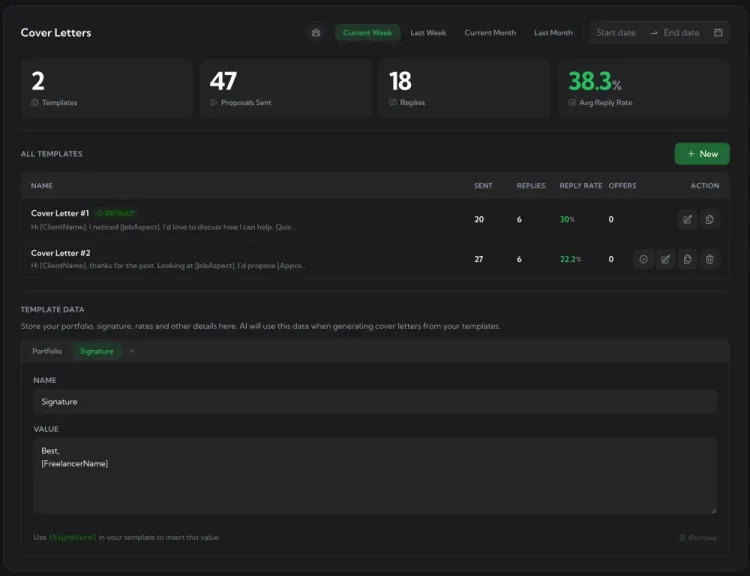
The /cover-letters page opens with four hero stats - how many templates you have, how many proposals each one has sent, how many came back with replies, and your blended reply rate. Per-user filtering (for teams) and date ranges live at the top. The All Templates table sits below with inline reply rate per template; Template Data (your variable library) is at the bottom.

Upwex Cover Letters dashboard - 4 stat cards (Templates / Proposals Sent / Replies / Avg Reply Rate) above the All Templates table with per-template Sent / Replies / Reply Rate / Offers columns, plus the Template Data section with Portfolio and Signature tabs

The /cover-letters page in your Upwex dashboard. User filter + date range live at the top; Template Data sits below the library.

AI tools

Three buttons inside the editor that do the real work.

Every template page hosts three AI actions in the fullscreen prompt editor. Each consumes one AI credit, runs on Gemini primary with OpenAI fallback, and returns structured output you can review before saving.

AI Improve

In-place rewrite of the template you're editing: tighter opener, more concrete proof points, fewer filler phrases. Returns a structured diff so you see exactly what changed (sparkles icon with the edit list). Surgical, not destructive.

1 AI credit per run

AI Generate

Creates a fresh template from scratch when the prompt textarea is empty. Pulls your synced Upwork profile (skills, portfolio, tone) and your Template Data variables as raw material. No hardcoded skills, names, or numbers - the structure is generic, the values are yours.

1 AI credit per run

Test Template

Two-phase pipeline: first finds a real matching Upwork job, then runs the full Cover Letter Generator pipeline against it and shows the proposal the AI would write. Pinned to the bottom of the editor so the content scrolls behind it - one click, see the output, decide.

1 AI credit per run
Anatomy of a template

Four parts. Each does one job.

A template is just structured instructions plus reusable placeholders. The editor surfaces every piece in the same spot so you always know what to change when reply rate dips.

  1. 1

    Name

    Internal label only - e.g. "React Senior", "Figma Landings", "Long-form Blog". Helps you pick the right one in the dashboard table and in Auto-Bidding rules.

  2. 2

    Prompt body

    The instructions the AI follows. Plain English with variable placeholders in brackets. Bracket-highlight overlay shows you each variable at a glance while editing.

  3. 3

    Variable chips

    Sidebar lists every Template Data placeholder ([ClientName], [Signature], etc.) plus built-in groups (job context, client info). Click to insert at cursor position.

  4. 4

    Test job target

    Pinned Test Template button at the bottom of the editor. Runs against a real job and shows the proposal the AI would write - so you fix the template, not the proposal.

Upwex Edit Template fullscreen editor - left sidebar shows Template Name + variable chip groups (Template Data, Freelancer, Client, Proposal) with insertable placeholders, right side has the prompt body with [ClientName], [Portfolio], [Signature] highlighted, AI Improve button + Save Changes in the top-right
Templates by niche

What a strong Upwork proposal template looks like, by niche.

A template locks in an Upwork proposal format: a fixed structure plus placeholder chips that get filled in per job from your synced profile and the Upwork posting. One prompt covers every job in its niche. Here are three you might keep for different kinds of work.

Technical opener

Web development
Template prompt

Open with a short greeting using [Client Name] if it's in the posting, otherwise "Hey,". No self-introduction, no preamble about the project. Lead the first sentence with my main skill being a perfect fit for this job, one skill, not a tech list.

Say I'm ready to start the core task, or ask for clearer details if the description is vague. If the posting has a question or application instructions, answer it partially, just enough to pull a reply.

Close with a call to action that asks for the exact next input needed to begin: access or permissions for an existing site, app, or codebase, or the starting material (Figma, brief, sitemap, API docs) for a build from scratch. Don't ask for access when there's nothing to access yet.

Add a portfolio block from [Portfolio]. Format as "My works:" with 3-4 links.

Sign off with "Cheers," then [Freelancer Name].

Hook-driven opener

WordPress / WooCommerce
Template prompt

Open with "Hi [Client Name]," then a hook that fits the job: a smart technical question, a confident war story, a pattern-break for crowded posts, or disarming honesty. Always tie it to something specific in the post.

Name the likely technical cause instead of rephrasing the brief, then back it with one matched [ProofPoint] from similar work.

Give [MicroFirstStep]: one concrete fix that shows value on day one.

Close with a single rate number from [Hourly Rate], never a range, and a soft CTA instead of a hard sell.

Sign off with [Freelancer Name] and 3 links from [Portfolio].

Insight + action plan

Any niche
Template prompt

Greet [Client Name] if it's available, otherwise just "Hey,". Briefly mention I've solved this exact type of problem before, then show one specific insight about their project that proves I understand the real problem, not just the title.

Give a short action plan: 2-3 concrete steps, not a generic "audit, build, deliver".

Address the budget briefly if one is specified. If the client emphasized something specific (a licensed tool, no AI, a hard requirement), acknowledge it directly.

Ask one question that's essential to clarify before starting.

Keep it concise, 80-150 words, no filler. Pick the 2-3 most relevant links from [Portfolio], then sign off with [Freelancer Name].

The green chips are placeholders. Upwex swaps them for real values on every generation, pulled from your synced profile and the Upwork posting:

  • [Client Name] the client's name from the posting
  • [ProofPoint] a specific past result that fits the job
  • [MicroFirstStep] one concrete day-one action
  • [Hourly Rate] my rate, shown as a single number
  • [Portfolio] my saved portfolio links
  • [Freelancer Name] my name from my Upwork profile
Test Template in action

See the proposal your template will write - before you ship it.

Test Template runs the full Cover Letter Generator pipeline against a real Upwork job and shows you the exact proposal the AI would write. Fix the template here, not the proposal later.

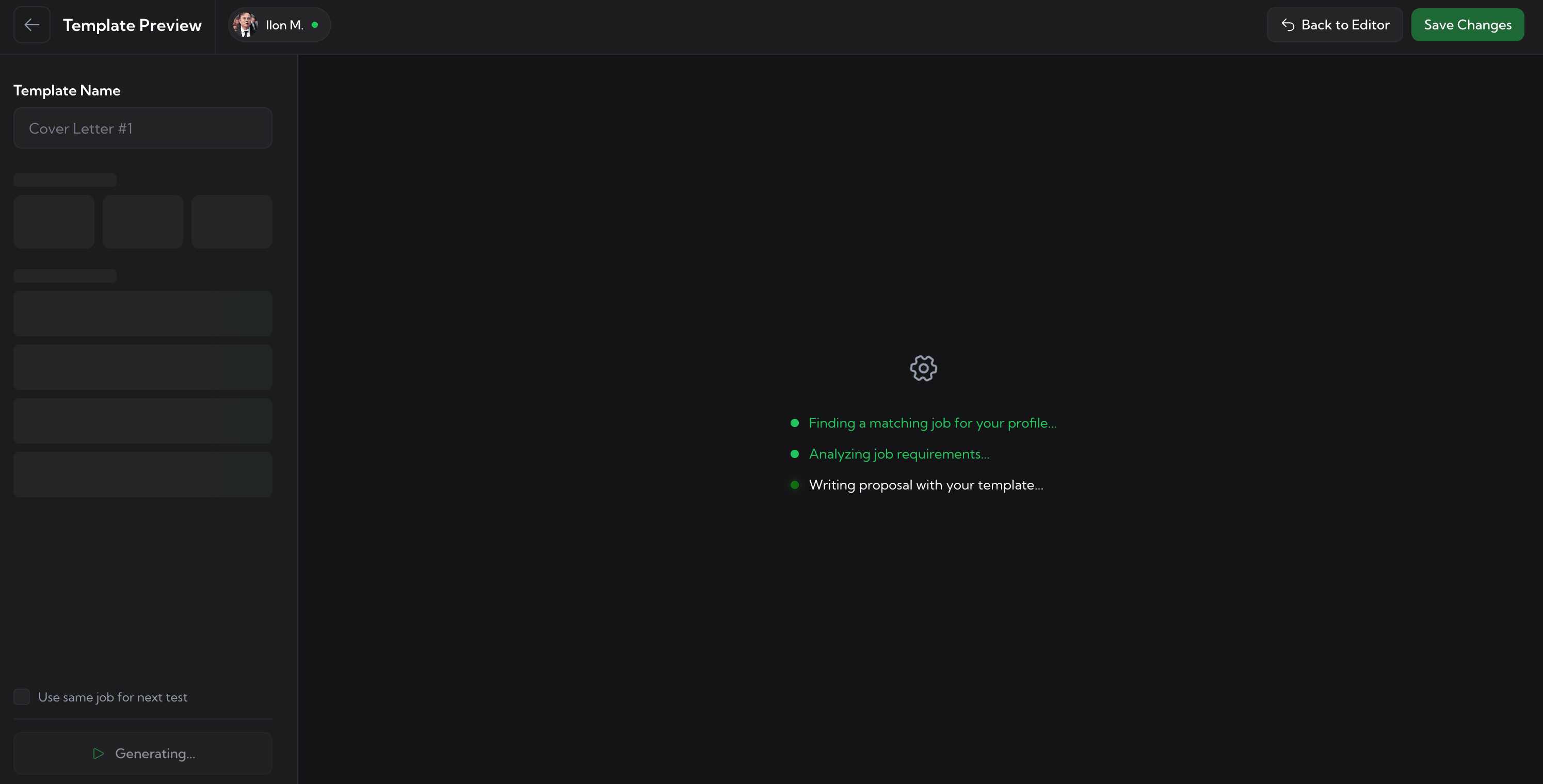
Phase 1 · Find

AI picks a matching job from the live Upwork feed.

The system finds a real, current Upwork posting that matches your synced profile (skills, hourly rate, location). Three live status pings keep you in the loop while it works.

Test Template - loading state showing three pipeline steps: Finding a matching job for your profile, Analyzing job requirements, Writing proposal with your template. Generating... button at the bottom.
Phase 2 · Generate

You see the proposal exactly as the client would.

Sample job preview + word count + read time + resolved variables on the left, the full generated cover letter on the right. Try Again to test against another job; Save Changes to ship the template.

Test Template result - sample Upwork job (Figma to WordPress Website Conversion, $700 fixed-price), stats panel (116 words, 5 paragraphs, ~1m read time), resolved variables ([Client Name] empty, [Signature]), and the generated cover letter Upwex wrote against this job.
Template lifecycle

Edit. Test. Set default. Let every tool use it.

Templates flow from the editor outward: once you set one as default, every Upwex AI tool that writes proposals reads from it - the manual Cover Letter Generator on the Upwork job page, the One-Click Proposal Autofill engine, and the Auto-Bidding bot.

  1. 01 · Edit

    Build in the editor

    Fullscreen prompt editor with bracket highlighting, variable chips, auto-save.

  2. 02 · Test

    Test against a real job

    Test Template runs the full pipeline on a sample Upwork posting before you ship.

  3. 03 · Set default

    Pick which one ships

    The default template is what every tool picks unless an Auto-Bidding rule overrides.

  4. 04 · In production

    Used everywhere

    Cover Letter Generator, Quick Apply, Auto-Bidding - all read the same library.

Pricing

Cover Letter Templates are included on every plan.

Start free for 7 days. No card required. Cancel anytime.

Lite

$ 9.99 /month
Monthly billing only
  • Check Fit Job Analyzer (0-100 score)
  • AI Cover Letter + Screening Q&A
  • Cover Letter Templates with per-template reply rate
  • Full analytics dashboard + Activity Heatmap
  • Multi-profile + Weekly recap emails
  • Adaptive AI engine (auto-failover)
  • 100 AI Credits / seat / month

Max

$ 49 /month
  • Everything in the Pro plan
  • 500 AI Credits / seat / month
  • Auto-Bidding scanner (24/7, hands-free)
  • Custom Match Algorithm prompt
  • Custom Red Flags prompt
  • 15+ Auto-Bidding settings (caps, schedule, scan)
7-day free trial No credit card required Cancel anytime
FAQ

Common questions about Upwork Cover Letter Templates.

What is an Upwork cover letter template?
An Upwork cover letter template is a reusable prompt you build once in the Upwex dashboard. It has a name, a prompt body (the instructions the AI follows), and variable chips (placeholders like [Client Name], [ProofPoint], [Portfolio]) that get filled in per job from your synced profile and the Upwork posting. Instead of rewriting every proposal from scratch, the AI writes a tailored cover letter from your template.
How many cover letter templates should I have?
As many as you need - Upwork cover letter templates are unlimited on every plan. Most active bidders keep 5-15 templates per profile, one per niche, language, pitch angle, or rate tier. Reply rate is tracked per template, so you keep the winners and prune the bottom 20% over time.
What does the best Upwork proposal template look like?
The best Upwork proposal template follows a tight format: it opens with a specific hook tied to the job, names the likely problem instead of rephrasing the brief, backs it with one matched proof point, proposes a concrete first step, and closes with a clear rate and a soft call to action. Keep it 80-150 words, no filler. That is a proven template for Upwork jobs in any niche - see the three template prompts above.
Can I track which template gets the most replies?
Yes. The dashboard shows a reply rate for every template, so you can see which Upwork cover letter template actually pulls responses. Sort by reply rate, set the top performers as defaults, and retire the ones that underperform.
Should I use a different template per niche?
Yes. A React job, a Figma redesign, and a SaaS blog post each need a different opener, proof point, and tone. Keep one cover letter template per niche (or per language and rate tier) and let reply rate tell you which ones to refine.
How do I test a cover letter template before using it?
Test Template runs your template against a real Upwork job in two phases: first it finds a matching job posting, then it generates the proposal the AI would write for it. You read the actual output before going live with the template. One AI credit per Test run.
Do my templates work with Auto-Bidding?
Yes - templates are the single source of truth. Auto-Bidding picks the right template for each job type and runs the same Generate flow you'd run manually. Same library, same variables, same AI - zero-click for the bot vs one-click for you.
Can I edit and set a default template?
Yes. Every template can be edited in a fullscreen prompt editor, duplicated, or deleted. Set any one as your default and it becomes the template Upwex uses when you click Generate on an Upwork job, including the proposals Auto-Bidding sends for you.

Build your library. Watch the reply rate climb.

Every proposal your AI writes is only as good as the template behind it. Start a free trial, seed your library, and run Test Template until the reply rate hits 10%+.

No credit card required. Cancel anytime.